BMW Performance Chips & Software for BMW 6 Series F13 (2012+)

Clear BMW chassis

Please ensure your correct model is selected

Performance tuning for your BMW gives it more efficient and effective ECU mapping which favor power delivery over comfort. BMW tuning legend Jim Conforti produces incredible software tunes for nearly every model to give drivers a noticeable upgrade in their car's capabilities. The Turner Chips, Shark Injectors, Sprint Boosters, and Burger Motorsports tuning software and handheld devices are all right here for you to give your BMW the engine management change it deserves.
Sort By:

MHD Wireless OBDII Wifi Flash Adapter V2 - BMW E, F, & G Chassis (N54...
affirm Starting At 0% APR - Subject To Eligibility. See Lending Terms
MHD Tuning - Corporate Logo
T#:9126157
Part#: MHDWIRELESSV2
In Stock
$ 99.99 USD
Free Shipping
$ 99.99 USD
Free Shipping

The new MHD Wireless OBDII WiFi Flash Adapter V2 allows you to reliably load flash maps to your BMW including JB4 back-end flash maps faster and easier than ever before. Just pair it with your Android or Apple phone and plug it into the OBDII port when you want to flash or use any MHD features. Compatible with E, F, or G Chassis BMWs with the following engines: N54, N55, S55, B58, S58, S63, & N13

NOTE: Additional engines & vehicles may be supported with Non-MHD applications such as Bimmercode or xHP. If your engine is not listed above, please check with the app you intend to use for compatibility with your vehicle.

MHD Flash Adapter Features & Benefits

Compatible with the MHD Flashing Platform,  BimmerCode, xHP, and many other wifi diagnostic apps

Load both MHD off-the-shelf maps and custom flash maps (available for limited applications - N54, N55, S55, B58, S58, S63, N13)

Faster flash times compared to wired OBDII cable

Uses Wifi for a reliable connection

Applications

E Chassis BMW

F Chassis BMW

G Chassis BMW

BimmerCode App & Info

All you need for coding your car with BimmerCode is one of the supported MHD OBD adapters and the BimmerCode phone app - https://bimmercode.app/

Show More Show Less
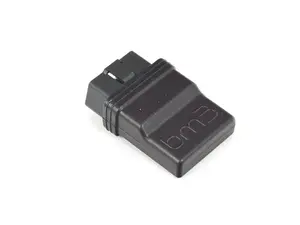
BM3 Wireless OBDII WiFi ENET CANBUS Flash Adapter - BMW F & G Chassis...
affirm Starting At 0% APR - Subject To Eligibility. See Lending Terms
Bootmod3 - Corporate Logo
T#:33746523
Part#: OBD2FA
Ships in 7 Business Days
$ 99.00 USD
Free Shipping on orders $49 and up

Introducing the latest and greatest Wireless connection method for your BMW F and G series vehicles and the 2020+ Toyota Supra, the all-new bootmod3 Wireless Adapter.

bootmod3 WiFi adapter is fully designed in-house by our engineers, built with the highest quality parts and a modern chipset. It achieves perfect reliability and is the quickest adapter currently offered on the market.

Features:

  • Fastest flash times over ENET and CANBUS
  • Reliable and consistent connectivity
  • Ability to configure your own WiFi password.

    • Most if not all other WiFi OBD adapters leave open WiFi access to your OBD port which is a security issue for your vehicle. With bootmod3 you can set/change to your own custom WiFi password securing access.
  • Wireless ENET support for BMW F and G series vehicles and 2020+ Toyota Supra
  • Wireless CANBUS Support
    • Unlike generic WiFi adapters, our adapter allows full flashing of transmission on GEN2 BMW and 2020+ Toyota Supra removing the need for additional WiFi adapters or DCAN cables
  • NO ALARMS if left plugged in (BMW G series vehicles and Toyota Supra)
    • Enters ultra-low power mode if left plugged in consuming just ~20mA
  • OTA updates through the new bootmod3 app
  • Firmware fully extensible for additional flash and diagnostic protocols for future connectivity support
  • Manual Toggle switch to fully power down the adapter
  • Small form factor, considerably smaller than generic WiFi ENET adapters
  • No VIN locking, can be used on multiple vehicles

Vehicles Supported:

  • All BMW F and G series vehicles
  • 2014+ Mini
  • 2020+ Toyota Supra (A90 A91)

Supported 3rd Party Applications:

  • OEM factory diagnostics such as ISTA and ESYS
  • XHP App
  • Bimmercode App
  • Bimmerlink App
  • ProTool App
  • ...and other apps requiring ENET and UDS to CANBUS support

When connected on iOS, copy your WiFi settings from Automatic to Manual and leave the Router field empty. This leaves your Mobile data connection active while connected with the vehicle.

Some items used and/or installed by PRO TUNING FREAKS may void portions of your vehicle’s factory warranty. Some items may not be legal for “on highway use”. PRO TUNING FREAKS makes no guarantees to the legality of any parts used for “on highway vehicles” and accepts no responsibility for compliance with the vehicle’s factory warranty.

Show More Show Less