Fault Code Readers and OBD Scan Tools for BMW X Series E71 (2008-2014)

Clear BMW chassis

Please ensure your correct model is selected

OBDII BMWs can tell owners almost anytime something is going on with a system function, but the proper tools are required. Turner Motorsport recommends all serious owners and at-home mechanics keep a scan tool and code clearing devices around to make short work of problems and complete services entirely that require system resets. All scan tools, code readers, and reset tools are located on this page.
Sort By:

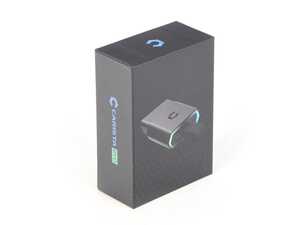
EVO Bluetooth OBD2 Adapter - Carista
Earn 5% back in Turner Rewards on orders placed 11/22/26 - 12/1/26. Redeem 12/7/26 - 12/31/26. Terms & conditions apply
Carista - Corporate Logo
T#:23714957
Part#: CARISTA-EVO
In Stock
$ 79.99 USD
Free Shipping on orders $49 and up
$ 79.99 USD
Free Shipping on orders $49 and up

Stop settling for basic OBD2 scanners. The Carista EVO Scanner is a game-changer, delivering unmatched customization, diagnostics, real-time insights, and service capabilities.

If you own a BMW or MINI, Carista EVO is the key to unlocking your vehicle's full potential.


Key Features:

  • 4x Faster Performance: Operates with superior Bluetooth connectivity, ensuring quicker access to all Carista App features.
  • Frequent Updates: Benefit from regular feature enhancements and support for additional car brands.
  • Easy Setup: Simply plug in the scanner, enable Bluetooth, press “Connect,” and explore your car's full potential.
  • One-Month Free Trial: Includes a complimentary trial of all paid features on the Carista App.
  • Unlocks SFD-Protected Features: Officially licensed by the VW Group for enhanced functionality.
  • Expanded Brand Support: Not just for VAG protocols—also compatible with BMW, MINI, Ford, Nissan, Toyota*, and more.
  • Cross-Platform Compatibility: Works seamlessly with both iOS and Android devices.


THE ALL-IN-ONE CAR TOOL


1.) Advanced Diagnostics:

Perform dealer-level electronic diagnostics (fault code checking and resetting) of all modules in the vehicle, including ABS, airbag, and other manufacturer-specific systems.


2.) Customizations - including the SFD-protected ones:

Control your car's behavior: unlock hidden features, including SFD-protected ones, and tailor your car to your preferences.

  • Gauge needle sweep at startup
  • Start screen logo
  • Virtual instrument cluster theme
  • Lights: DRL, coming/ leaving-home
  • Throttle response behavior
  • Lane-change turn signal auto-flasher count
  • And more!


3.) Live Data: 

Stay informed about your car's health and performance with live data readings.

  • Launch control count
  • Mileage information
  • Airbag crashes count
  • Service interval info
  • Engine Turbo
  • Car Battery info
  • And more!


4.) Service Tools:

Perform simple DIY procedures: Save on routine maintenance and avoid lengthy workshop visits.

  • Electronic parking brake (EPB) retraction tool
  • Service reset
  • Tire pressure sensors (TPMS)
  • Diesel Particulate Filter (DPF) regeneration
  • Battery registration
  • Video in Motion
  • And other helpful tools.


All paid features mentioned above are available with an in-app purchase of our Pro functionality: an auto-renewable subscription at $49.99 USD/year or $19.99 USD/3 months or $9.99 USD/month.

Free Basic OBD2 Diagnostics, Basic OBD2 Live Data, and Emissions Test Service Tool for all cars with OBD port.

*Note:

In addition to makers listed on our website, this product is compatible with most Toyota, Lexus, Scion, Nissan, Land Rover, Lincoln, Infiniti, Seat, and Skoda models. Please visit here for more details and complete feature compatibility.

Show More Show Less
Carista Bluetooth OBD2 Adapter - BMW & Mini
This application supports advanced diagnostics, customizations
Earn 5% back in Turner Rewards on orders placed 11/22/26 - 12/1/26. Redeem 12/7/26 - 12/31/26. Terms & conditions apply
Carista - Corporate Logo
T#:391453
Part#: COBD-BT24
In Stock
$ 39.99 USD
Free Shipping
$ 39.99 USD
Free Shipping
Carista is a smartphone application for both iOS and Android devices that allows owners to diagnose vehicle faults, reset service indicators, and customize vehicle systems without any complicated coding. In order to use Carista on your vehicle, only three things are required: An iPhone, iPad, or iPod touch running iOS 8.0 or later OR an Android device running Android 2.3 and up The Carista OBD2 App: Available on the Apple AppStore and Google Play Bluetooth OBD2 Adapter: Available HERE! Uses Bluetooth 4LE which prevents drainage to the car's battery due to it's power saving mode. Since the adapter is Bluetooth, the Wi-Fi connection on your mobile device remains open so you can still browse the internet while still remaining connected to the vehicle. The Carista Bluetooth OBD2 Adapter is also compatible with the OBD Fusion app on iOS and Android. Diagnose (OBD2): Carista can check your vehicle's health and report any faults stored in its computers. You can also clear any fault codes and reset your "check engine" light, as emissions test readiness. This is a FREE feature. Diagnose (Manufacturer-Specific): Unlike regular OBD2 apps, Carista also gives you access to advanced manufacturer-specific diagnostics, including computers like ABS, airbag, navigation, etc. and gives you the ability to reset your airbag light, ABS light, traction control light, etc. Manufacturer-Specific Diagnosis is a PAID feature; supported vehicles only. Customization: Carista gives you the power to personalize the behavior of your car’s windows, lights, instruments and more, with a click of a button. Customization is a PAID feature; supported vehicles only. Service: With Carista’s DIY tools, resetting your oil service indicator, servicing your electronic parking brake or checking your launch control count becomes a 1-click action. This is a PAID feature; supported vehicles only. Pricing: All PAID features listed above are available with an in-app purchase of Pro functionality: complimentary 1 month trial included, annual subscriptions are $39.99/year.
Show More Show Less
Foxwell TS7000 Smart Diagnostic And TPMS Tablet
Our Doorbuster deals are in limited supply at these prices. Get yours while they're in stock! Can't find the perfect bundle? Call or chat with us to build a custom one. 10X Entries For Our Spin To Win Sweepstakes! Earn 5% back in Turner Rewards on orders placed 11/22/26 - 12/1/26. Redeem 12/7/26 - 12/31/26. Terms & conditions apply
Doorbusters - Corporate Logo
T#:27105175
Part#: TS7000
In Stock
Sale - Save 34% $ 679.99

This product was last offered at the strikethrough price on
11-07-2026

$ 449.00 USD
Free Shipping on orders $49 and up
Sale - Save 34%
$ 679.99

This product was last offered at the strikethrough price on
11-07-2026

$ 449.00 USD
Free Shipping on orders $49 and up

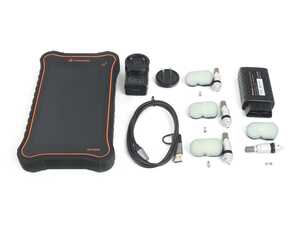
The Foxwell TS7000 Tablet Diagnostic and TPMS Service Tool is designed to elevate your TPMS diagnostics experience to a professional level. This versatile tool serves as your second or third step into TPMS diagnostics, offering a comprehensive range of features for both TPMS and high-level diagnostic functions.

At its core, the Foxwell TS7000 enables you to activate OEM/Universal TPMS sensors, retrieve detailed TPMS sensor data (including sensor ID, tire pressure, temperature, battery condition, and OE part number), relearn 98% of sensor IDs, program FOXWELL T10-sensor for sensor replacement, and test Remote Keyless Entry Key Fobs. 

But that's not all. This tool goes beyond TPMS with advanced diagnostic capabilities such as ABS Bleeding, EVAP system testing, Oil Resets, Fuel Pressure Testing, Oxygen Sensor Testing, and comprehensive Code Reading functionality. With regular hardware and software updates, the Foxwell TS7000 ensures that you stay ahead in tackling automotive issues with precision and efficiency.


Standout Features (How does it standout from previous models, i.e. the T1000/T2000?):

  • Will allow you to connect to all sensors at once and view all of their data at the same time
  • Can now program sensors by copying through OBD (eliminates need for relearn, see "Programming" in description for details)
  • Wireless connection to OBD2 port
  • Wireless updates (One Touch Update)
  • Larger screen (5.5-inch screen, T2000 is 2.8-inch)
  • Updated, larger hardware (32 GB RAM, 5V battery, now offers camera for VIN-reading)
  • CAN FD support
  • Print TPMS sensor data on PC


More Features:

  • Activate 98% OEM/Universal TPMS sensors
  • Programs FOXWELL T10 Sensors in 4 Different Ways: Copy by OBD, Copy by Activation, Copy Manually, and Auto Create Sensors
  • 3 TPMS Relearning Methods: OBD Relearn, Automatic Relearn, and Stationary Relearn
  • Fast Reading Sensor Data: Include sensor ID, tire pressure, temperature, battery, frequency, etc.
  • Key Fob Testing Tool: Precisely test 315MHz and 433MHz key fobs to ensure whether it is perfectly running
  • Read TPMS Live Data
  • Basic Code Reading capabilities using OBDII
  • Solid and Rugged Construction: Well-constructed with materials designed to handle harsh work environments
  • Intuitive and Easy Instructions: Easy to navigate and operate with clear instructions and detailed user manual
  • Free Software Updates for Life
  • LIFETIME REPLACEMENT program


Programming:

With this TPMS programming tool, you can program FOXWELL T10 TPMS sensors (T2317833 or T2317834 ) to meet the specifications of a particular vehicle before new sensor installation and relearn. 4 different sensor programming methods are supported by the FOXWELL TS5000 TPMS Service Tool: Copy by Activation; Manual Create; Automatic Create. (Note: TS5000 will only program a replacement sensor if it is a FOXWELL T10 sensor, which can be easily found on our site.)

  • Copy by OBD:
    • This method pulls the previously registered sensor ID through the vehicle's TPMS module using OBDII, and will then program the ID to the FOXWELL T10 sensor
    • This eliminates the need for a relearn by combining both steps into one
  • Copy by Activation
    • If your original sensor works and can be activated. You could use this method to program a new sensor. It will clone the original ID to the new FOXWELL T10 sensor.
  • Copy by Manual Input:
    • If you know the original sensor ID, you can input the ID to program new sensor.
  • Auto Create Sensors:
    • If you don't know the original sensor ID or your original sensor was bad, you can choose this method. Install new sensor ID--> program new sensor--> perform TPMS learning and let the car recognize new sensor


Relearning:

The FOXWELL TS5000 TPMS Service Tool can be used as a professional TPMS relearn scanner, to relearn almost all known sensor IDs, which is compatible with 95% of vehicles equipped with TPMS and extremely popular among car repair ships and DIY car owners. To ensure compatibility with different vehicles, 3 types of TPMS sensor relearning are offered:

  • OBD Relearn:
    • Usually the most effective relearn tactic, this will allow you to connect the TS5000 to your car wirelessly using the OBDII port and placing your vehicle in a relearn mode.
  • Automatic Relearn:
    • For some vehicles, the “Relearn” function can be completed automatically by driving, which makes it quite easy to do a complete set of sensor replacement operations on your own. Be aware that this may require you to drive the vehicle at a certain speed for a designated amount of time for it to relearn.
  • Stationary Relearn:
    • TS5000 allows the new TPMS sensor IDs to be transferred without driving a vehicle. You can trigger the sensors when the vehicle is in learn mode by our TPMS Tool TS5000. This will usually require a specific sequence created by the vehicle manufacturer as well, such as pressing the brake a few times, turning the key, etc.

Please note that some vehicles require a combination of these relearning methods, such as needing to drive for a designated amount of time after relearning using OBD. There may also be extra steps your manufacturer uses, so please research your specific vehicle when performing a relearn!


Note:

  • Certain functions may be limited from the vehicle manufacturer due to the requirement of a special factory access code. 
    • Pre OBDII vehicles will have limited feature availability
  • We recommend purchasing a Bentley Manual to use with your TPMS Tool.
  • You will need to register your TPMS tool in order to receive update notice's from Foxwell via E-mail
  • Vehicles with 20 pin under hood connector will require T366829  for use 


Support:

For software and hardware support from Foxwell the address is http://www.foxwelltech.com/support/ - Make sure you use the correct address

For after sales issues please contact Nina at [email protected]. Please allow 48 hours for response.

Show More Show Less