

Select Vehicle
BMW
Mini
Please ensure your correct model is selected

This product was last offered at the strikethrough price on
05-03-2026
This product was last offered at the strikethrough price on
05-03-2026
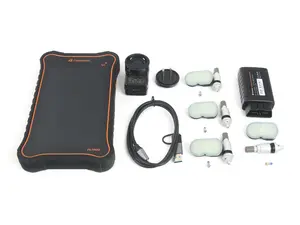
The Foxwell TS7000 Tablet Diagnostic and TPMS Service Tool is designed to elevate your TPMS diagnostics experience to a professional level. This versatile tool serves as your second or third step into TPMS diagnostics, offering a comprehensive range of features for both TPMS and high-level diagnostic functions.
At its core, the Foxwell TS7000 enables you to activate OEM/Universal TPMS sensors, retrieve detailed TPMS sensor data (including sensor ID, tire pressure, temperature, battery condition, and OE part number), relearn 98% of sensor IDs, program FOXWELL T10-sensor for sensor replacement, and test Remote Keyless Entry Key Fobs.
But that's not all. This tool goes beyond TPMS with advanced diagnostic capabilities such as ABS Bleeding, EVAP system testing, Oil Resets, Fuel Pressure Testing, Oxygen Sensor Testing, and comprehensive Code Reading functionality. With regular hardware and software updates, the Foxwell TS7000 ensures that you stay ahead in tackling automotive issues with precision and efficiency.
Standout Features (How does it standout from previous models, i.e. the T1000/T2000?):
More Features:
Programming:
With this TPMS programming tool, you can program FOXWELL T10 TPMS sensors (T2317833 or T2317834 ) to meet the specifications of a particular vehicle before new sensor installation and relearn. 4 different sensor programming methods are supported by the FOXWELL TS5000 TPMS Service Tool: Copy by Activation; Manual Create; Automatic Create. (Note: TS5000 will only program a replacement sensor if it is a FOXWELL T10 sensor, which can be easily found on our site.)
Relearning:
The FOXWELL TS5000 TPMS Service Tool can be used as a professional TPMS relearn scanner, to relearn almost all known sensor IDs, which is compatible with 95% of vehicles equipped with TPMS and extremely popular among car repair ships and DIY car owners. To ensure compatibility with different vehicles, 3 types of TPMS sensor relearning are offered:
Please note that some vehicles require a combination of these relearning methods, such as needing to drive for a designated amount of time after relearning using OBD. There may also be extra steps your manufacturer uses, so please research your specific vehicle when performing a relearn!
Note:
Support:
For software and hardware support from Foxwell the address is http://www.foxwelltech.com/support/ - Make sure you use the correct address
For after sales issues please contact Nina at [email protected]. Please allow 48 hours for response.
This product was last offered at the strikethrough price on
05-03-2026
This product was last offered at the strikethrough price on
05-03-2026
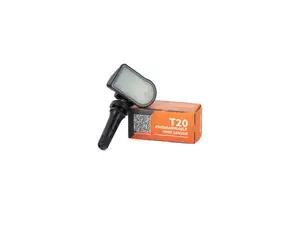
The Foxwell T20 TPMS sensor integrates both 315 MHz and 433 MHz frequencies, replacing more than 99% of OEM direct TPMS sensors on the market. The all-new, high-precision air valve prevents air leakage and provides a durable seal - an upgrade over the outgoing T10. Its proprietary sensor body features a long-lasting, lightweight 3V battery and supports unlimited wireless programming. Sensors can easily be activated and programmed with the Foxwell T2000 TPMS Service Tool (ES#4674668).
Features:
Rubber valve stem Supports 315MHz and 433MHz frequencies High-precision air valve to avoid air leakage 0-30° adjustability Built-in battery with an extended service life (more than 5 years) Temperature reading range of -40°F to 257°F Pressure monitoring range of 0 to 130.53 psi 12G weight
This product was last offered at the strikethrough price on
05-03-2026
This product was last offered at the strikethrough price on
05-03-2026
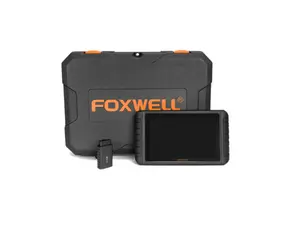
Schwaben by Foxwell i80II OBD2 Diagnostic Tablet: Reliable Engine Troubleshooting Made Easy
The Foxwell i80II OBD2 Diagnostic Scan Tool is your ultimate companion for swift and accurate vehicle diagnostics. Designed for both DIY enthusiasts and professional mechanics, this scanner delivers comprehensive data to help identify and resolve engine issues with precision. Its user-friendly interface and robust build make it a must-have tool in any garage.
Key Features:
Wide Compatibility: Supports all OBD2-compliant vehicles (1996 and newer), including cars, SUVs, and light trucks. Advanced Diagnostics: Reads and clears diagnostic trouble codes (DTCs) for the engine, helping identify check engine light causes. Live Data Stream: Displays real-time vehicle sensor data, enabling in-depth monitoring of your car's performance. I/M Readiness Check: Prepare your vehicle for emissions testing by checking system readiness status. Freeze Frame Data: Captures a snapshot of critical information at the time a trouble code is triggered. Durable and Portable: Compact design with a sturdy, rugged build to withstand daily use. Color Display and Intuitive Navigation: Features a bright LCD screen for easy viewing and a simple button layout for efficient operation. Plug-and-Play Functionality: No need for batteries or charging – powers directly from your vehicle's OBD2 port. Benefits:
Quickly diagnose and address engine issues to save time and money on repairs. Gain insights into your car's performance with detailed sensor data. Stay emissions-compliant with pre-checks for smog tests. Easy for beginners while offering enough features for professionals. Kit Photos:
i80II Main Unit VCI FoxLink I USB Charger USB Cable for VCI BMW 20 Pin Adapter VAG 4 Pin Adapter Mercedes-Benz 38 Pin Adapter Toyota 22 Pin Adapter Nissan 14 Pin Adapter Kia 20 Pin Adapter Fiat 3 Pin Adapter GM 12 Pin Adapter Mitsubishi & Hyundai 12+16 Pin Adapter Honda 3 Pin Adapter PSA 2 Pin Adapter Mazda 17 Pin Adapter Toyota 17 Pin Adapter Clipper Cable OBDII 16 (DB15) Cable Cigarette Lighter RJ45 Ethernet Cable USB to Ethernet Connector DOIP Cable Quick Start Guide Lighter Fuse User's Manual With the Foxwell i80II, you can take control of your vehicle's health and confidently tackle engine diagnostics. Whether you're clearing a pesky check engine light or diving into advanced data, this scan tool ensures you're equipped to keep your car running smoothly.
Make diagnostics simple – add the Schwaben by Foxwell i80II OBD2 Diagnostic Scan Tool to your toolkit today!